AI meeting capture and notes
Tools whose official sites describe capturing a meeting, transcribing it, or writing notes, as the first step in a handoff.
8 listed tools
A practical directory for meeting handoffs
Browse verified listings of tools whose official sites describe capturing a meeting, writing notes, extracting action items, and passing work to a teammate or another app. This is a local preview site — nothing has been published online yet.
Tools whose official sites describe capturing a meeting, transcribing it, or writing notes, as the first step in a handoff.
8 listed tools
Tools whose official sites describe turning meeting notes into action items, tasks, or updates in another app.
5 listed tools
Tools whose official sites describe sending follow-up, syncing a CRM, or passing work to the next person after a meeting.
8 listed tools
A complete list of the meeting-capture, notes-to-tasks and follow-up tools currently listed on this directory.
9 listed tools
These featured listings are real products. Facts were checked on each vendor’s official website on 2026-11-18. Prices and features can change.
An official meeting-notes tool with a free Basic plan, Pro at $16.99/user/month or $8.49/user/month on the annual toggle (save 50%), and Business at $30 or $24/user/month. Official use cases include automatic follow-ups and CRM sync.
An official bot-free meeting-notes app. Official Basic is $0 per user per month; official Business is $14 per user per month and includes follow-up emails plus integrations with Notion, HubSpot, Attio, Affinity and Zapier; official Enterprise is $35 per user per month.
An official meeting-notes platform with a free plan, Pro at $18 or $10 per seat/month billed annually, and Business at $29 or $19 billed annually. Official Pro includes an action-items and task manager plus an email assistant.
An official meeting recorder with a free forever plan, Premium from $16/month per user billed on the annual toggle, and Team from $15/month per user (two-user minimum). Official Premium includes AI-generated action items, and official Business includes automatic CRM field sync after meetings.
An official AI meeting assistant with a free plan, Team at $7/user/month billed annually or $11 billed monthly, and Business at $15 or $23. Official plans include AI action items; official Team adds project-management and Notion or Confluence integrations.
An official meeting-assistant with a free Basic plan, Pro at $15.99, and Business at $27. Official Pro is described as automating the follow-up work after every meeting, including CRM sync and Zapier, Make or n8n. A Black Friday promo was visible and is not treated as the list price.
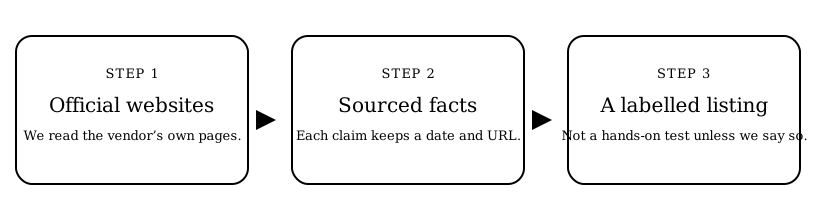
Start with a category, open a listing, then follow the official website link. Comparison pages summarise what vendors say about their own products. They are not paid rankings and they do not include star ratings or invented reviews. Listings have not been hands-on tested unless a page clearly says otherwise.
Read How we review to see how facts are checked, how AI-drafted text is labelled, and how advertising would be marked.
Meeting notes to tasks · Meeting follow-up tools · How to turn notes into action items · Submit a tool